Projects Roofing Proposal Management
An AI Proposal Builder, Synced to the CRM
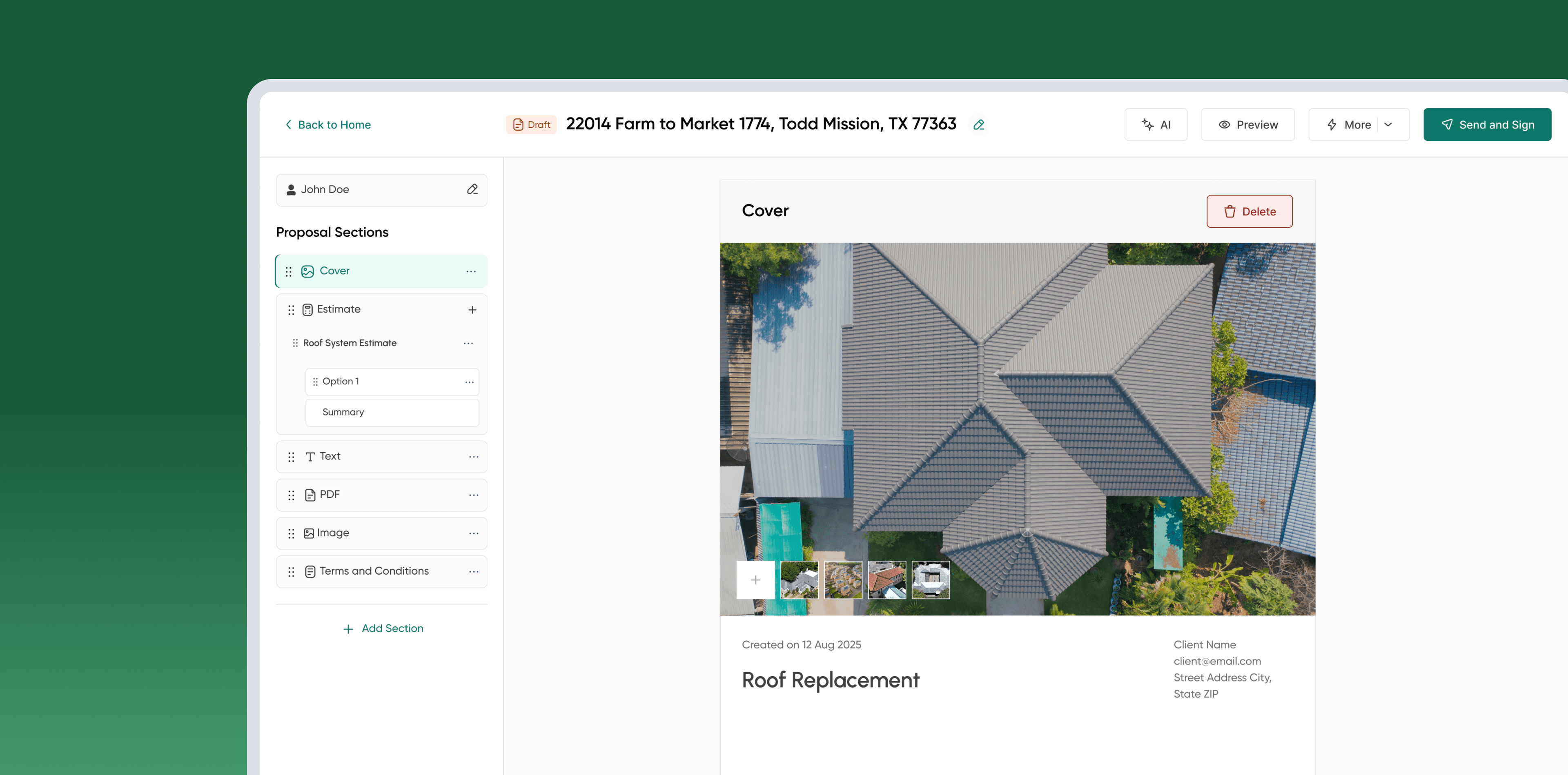
The CRM gave every job one home in production, but proposals still lived in Roofr, disconnected, every one starting from a blank page. So we built our own proposal app, synced to the CRM by job and property address, with an AI editor at its center: describe the job in a prompt, get a full draft back, then shape it in conversation until it's ready to send.
- Company
- Priority Roofing (USA)
- Timeline
- Jun 2026 - 3 weeks
- Team
- Developers, Stakeholders, Tester, Product Designer
WHERE THIS IS TODAY
Not a redesign of Roofr. A standalone AI-first proposal app, synced to the CRM by job and address, built around one conversation: describe the job, get a complete draft, then refine it by talking to it, without retyping anything the CRM already has.
40% → 60%
proposal drafting completion rate before and after the AI editor shipped
2
estimate types, itemized and roof system, built on one shared catalogue
6
modules covering assessment through proposal delivery
Before the Agent, Every Proposal Was Typed From Scratch
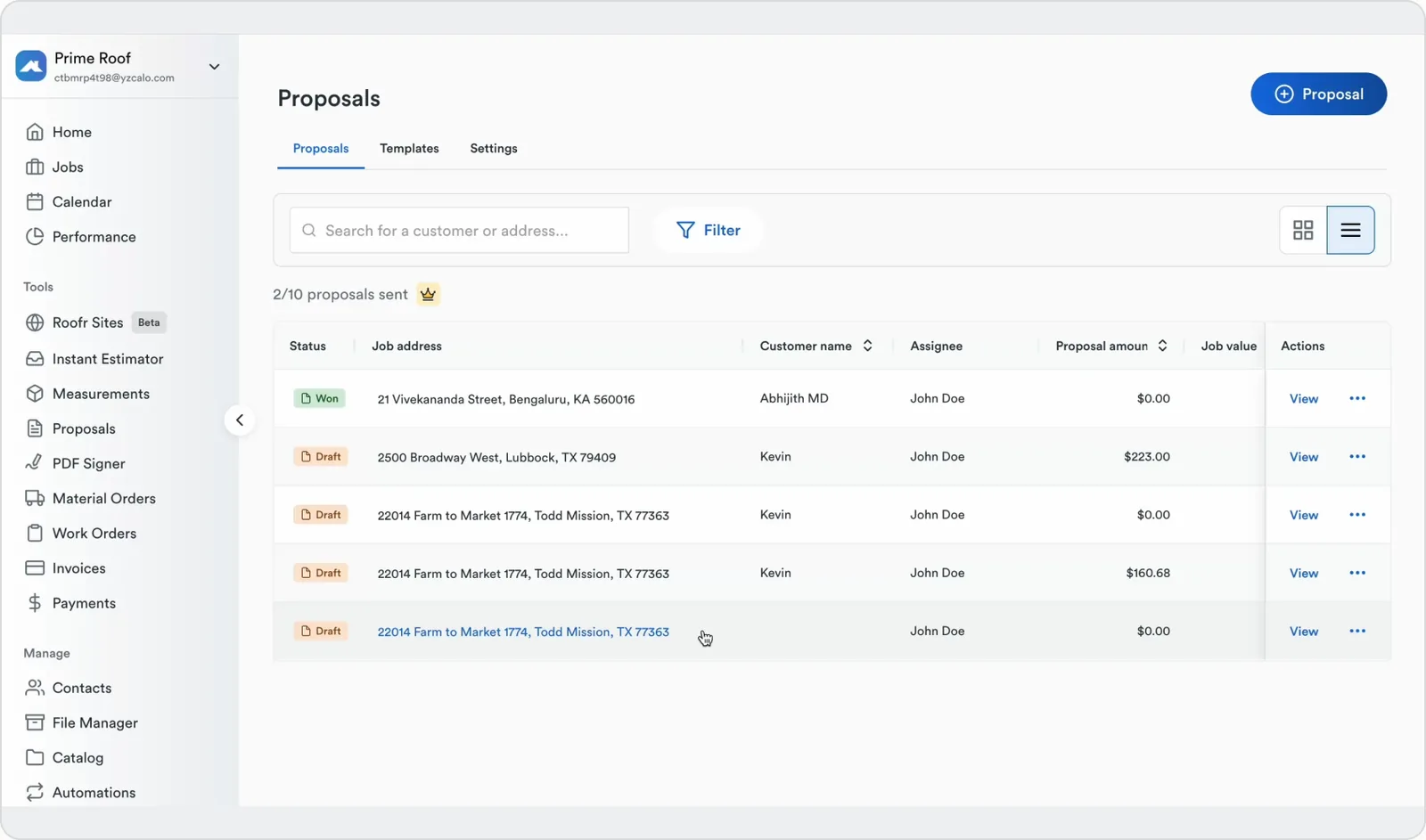
Once the Roofing CRM shipped, a job had one home from won to paid. But a job had to be won first, and that front half, the assessment and the proposal, happened outside the CRM, inside a third-party tool called Roofr. Roofr had no intelligence in it: it measured roofs and handed a rep a form, one section, one line, one price, typed by hand, disconnected from every piece of data the CRM already held about that customer and job. A rep who'd just qualified a prospect inside the CRM left it entirely to write a proposal from nothing, with no system reading the job for them.
Roofr
Assessment & proposals
Roof measurements, damage assessment, and a manual proposal form.
Fully disconnected from the CRM, and nothing in it drafted anything. Every proposal began blank, no matter how many times a rep had built one like it.
The CRM
Everything after a job is won
Production, scheduling, materials, and commissions for a job already in motion.
No way to receive a job before it existed, or read one and act on it. The front half of the sale happened somewhere else entirely.
“I qualify the lead in the CRM, then type the same customer into Roofr to actually sell them anything. If the deal closes, I copy it all back by hand.”
Nothing Here Was Smart, and Reps Paid for It Every Time
This was the same problem the CRM had already solved, showing up again on the other side of the job. Not a missing integration, a missing layer of intelligence, nothing here could read a job and act on it. Five issues kept coming up.
Disconnected from the CRM
Roofr had no relationship to the jobs and customers already living inside the CRM, every proposal started from a blank system.
Data typed twice, scattered everywhere
Reps re-typed customer and job details by hand, while photos, damage notes, and documents ended up split across whatever tool was open.
Approval disconnected from job tracking
A proposal being approved didn't mean anything to the CRM. Someone still had to notice and manually start the job.
The cost compounded
Every re-entry was a chance to introduce an error, and every manual handoff was time a rep or back-office spent not selling or building.
Every proposal started from a blank page
No faster way in, even a rep who'd built the same roof-system proposal fifty times still typed it from zero. The tool meant to save time cost the same amount every time.
THE PATTERN UNDER ALL FIVE
Every fix here needed the proposal to start already knowing the job, not a rep starting from nothing.
Testing Whether Reps Would Actually Trust an Agent to Draft for Them
Before designing a replacement for Roofr, I traced a real proposal start to finish, from booking the assessment to the homeowner's signature, and talked to everyone involved. Not a feature audit. Two questions mattered more than any missing-feature list: was there enough structured data to ground an AI agent in the job, and would a rep actually trust a machine-written draft enough to send it.
WHO A PROPOSAL PASSES THROUGH
3 personas

Marcus Bell
Sales Repassessment → proposal sent- Age
- 31
- Location
- Dallas, TX
- Tools
- CRM, Roofr, phone
- Tech
- High, phone-first
Qualifies the lead in the CRM, then builds the proposal in Roofr from nothing. Measures the roof, photographs the damage, and wants the proposal out before he leaves the driveway, since the homeowner is collecting quotes from two other companies this week. Skeptical a machine could write something he'd send without rewriting it first.
MOTIVATIONS
- First good proposal in the door usually wins the job
- Commission depends on closing, not on quoting
- Wants a draft, not a form, to start from
GOALS
- Describe the job once and get a proposal back, not a blank one
- Trust the draft enough to send it with light edits, not a rewrite
- Stay in control of anything the agent changes
FRUSTRATIONS
- Typing the same proposal shape from zero on every single job
- Not knowing if he can trust a number he didn't calculate himself
- Worried an AI draft would read generic instead of like his own pitch
“If it can write the first draft in the truck before I even get home, I'll try it. The second it gets a price wrong, I stop trusting it completely.”
STAKEHOLDER SESSION
3 roles · 9 questions
Every session came back to the same question, phrased differently per role: could a system that reads the job and drafts on its own actually be trusted here.

Sales Reps
Assessment → close
If you described a job in a sentence and got a full draft back, would you send it, or rewrite it?
What would an AI-written proposal need to get right before you'd trust its price?
How much do you want to keep typing yourself versus handing to a system?
Back Office
Approval, contracts, job creation
What would you need to see to trust that a machine wrote this proposal correctly?
Where's the line on what an agent should be allowed to change without asking first?
What's the one AI mistake that would make you shut the whole thing off?
The data to ground an agent already existed, just scattered
The job, the customer, the assessment, the catalogue, everything an agent needed was already captured somewhere, just across three disconnected tools instead of one schema it could read.
Trust would live or die on the first wrong price
Every rep and back-office session landed on the same line: one bad number, and they'd never trust a draft again. Confidence had to be earned before speed even mattered.
Nobody wanted automation, they wanted a draft they could argue with
Reps didn't want a black box sending proposals on its own. They wanted a starting draft and a way to talk back to it, control had to stay visibly theirs.
THE GUIDING QUESTION
What if a rep could describe a job in a sentence and actually trust what came back?
Build Our Own App, Not Bolt Onto Roofr
The first real decision wasn't a screen, it was whether to integrate Roofr's API or build our own app. Integrating would have synced the two systems, but reps would still open Roofr itself, blank forms and all, with no room for the AI layer we wanted. We built our own standalone app instead, linked to the CRM the simple way: the same job and property address, so a rep never re-enters a customer or job, even with two products open.
Roofr as the system of record for a sale
It solved assessment and proposals in isolation, but every proposal it produced started disconnected from the job it was for.
A standalone Proposal Management app, synced by the job
Assessment, proposal, approval, and signing all live in their own app, linked back to the CRM by the same job and property address, so nothing a rep already entered has to be typed again.
The CRM's pipeline backward, into the sale itself
The Job Cycle already carried a job from won to paid. This work extends that same idea one stage earlier, to first inspection.
THE CALL THAT SHAPED IT
Put an AI agent inside the builder, not beside it
Drafting a proposal from scratch was the slowest part of a rep's day → a prompt generates the full draft, and the same agent refines any section in place.
Sync by the job, don't duplicate the record
Assessments and proposals had no link to the job that already existed → linked to the CRM by the same job and property address, not copied into it.
Make proposals dynamic, not just templated
Every roofing service prices and reads differently → templates are a starting point; sections rebuild per job.
Split pricing into two catalog types
Itemized work and full roof systems don't price the same way → two catalog structures, one estimate engine underneath.
Close the loop with signing, not a handoff
An approved proposal used to become someone's manual task → signing happens inside the flow and creates the job directly.
One Path From Inspection to Signature
A prospect leaves the CRM's qualifying stage as a scheduled assessment, not a "won job" that shows up later from somewhere else. It moves forward as the same job, synced between the CRM and the proposal app by that job and address, through one flow, until a signed contract hands it to production.
The Feature the Whole App Was Built Around
Every other module here keeps a job's data in one connected place instead of scattered across tools, synced back to the CRM by job and address rather than merged into it. But the AI editor is what makes that faster than the old way: a rep describes the job and keeps talking to the draft until it's right, which only works if the draft is trustworthy and easy to correct. Three decisions drove that: what the agent is grounded in, what it hands back, and what it does when it doesn't have enough to work with.
One prompt, grounded in the job, returns a full draft
The slowest part of a rep's day was staring at a blank proposal after a long inspection. Now they describe the job in a prompt and get a complete draft back, built from whatever the job already knows about itself.
One prompt, informed by the job's own assessment data, produces a complete first draft, sections, scope language, and starting pricing already in place.
The rep keeps editing by hand or asks the agent to change one specific part, the agent never rewrites what wasn't asked for.
Prompted with the job's own data, not typed from scratch
The CRM and proposal builder stay separate tools, but the same job and property address link them, so a rep's CRM entries carry straight into the prompt, alongside the linked assessment, roof type, measurements, and recorded damage. With no assessment linked, it drafts from the prompt alone and marks pricing provisional instead of pretending it measured the roof.
Outputs the builder's own schema, not paragraphs to paste in
A draft comes back as sections, scope language, and catalogue-linked line items, the exact structure the builder already edits. Nothing generates as prose that has to be reformatted into the tool.
Every inline edit is a diff, never a silent rewrite
Ask it to re-price one line or rewrite one section and it changes only that. Everything else in the proposal stays exactly what the rep left it as.
What a Draft Actually Returns
WHAT CHANGED AFTER THE FIRST VERSION
The first draft agent rewrote the whole proposal on every request
One tweak to a price meant re-reading the entire proposal to see what else moved → edits scoped to a single section, a diff, not a rewrite.
Early drafts didn't say when they were guessing
A prompt-only draft looked exactly as confident as one built from a real assessment → provisional pricing flagged the moment there's no assessment behind it.
The agent used to invent scope items that weren't in the catalogue
A generated line item with no matching price left a rep to catch it manually → unmatched items get flagged for the rep instead of priced automatically.
The same AI editor restructures the proposal, not just its wording
Rewriting a paragraph was never the whole job. A proposal often needs a section added, one removed, or the order changed. The AI editor handles this the same way it handles wording: on request, in place, without the rep leaving the builder.
A referenced item isn't in the catalogue
The agent flags the line for the rep to resolve instead of inventing a price or a scope item that doesn't exist in the system.
No assessment is linked
It still drafts from the prompt, but every price on that draft is marked provisional until a real assessment backs it.
An edit request doesn't map to one section
Rather than guessing which part of the proposal to change, the agent asks the rep to point at the section instead of touching the wrong one.
Every AI edit can be undone
Nothing the agent changes is final. A rep can step back to the version before any AI edit, drafting or refining, the same as undoing their own typing.
The Six Modules the Agent Reads From and Writes Into
The AI editor doesn't work in isolation, it reads and writes through the same six modules a rep would use by hand: daily selling work, the configuration that grounds and bounds the agent, and the admin layer that closes the loop.
Dashboard
Gives reps visibility into their pipeline, assessments, proposals sent, approvals, and closed projects, plus recent activity at a glance.
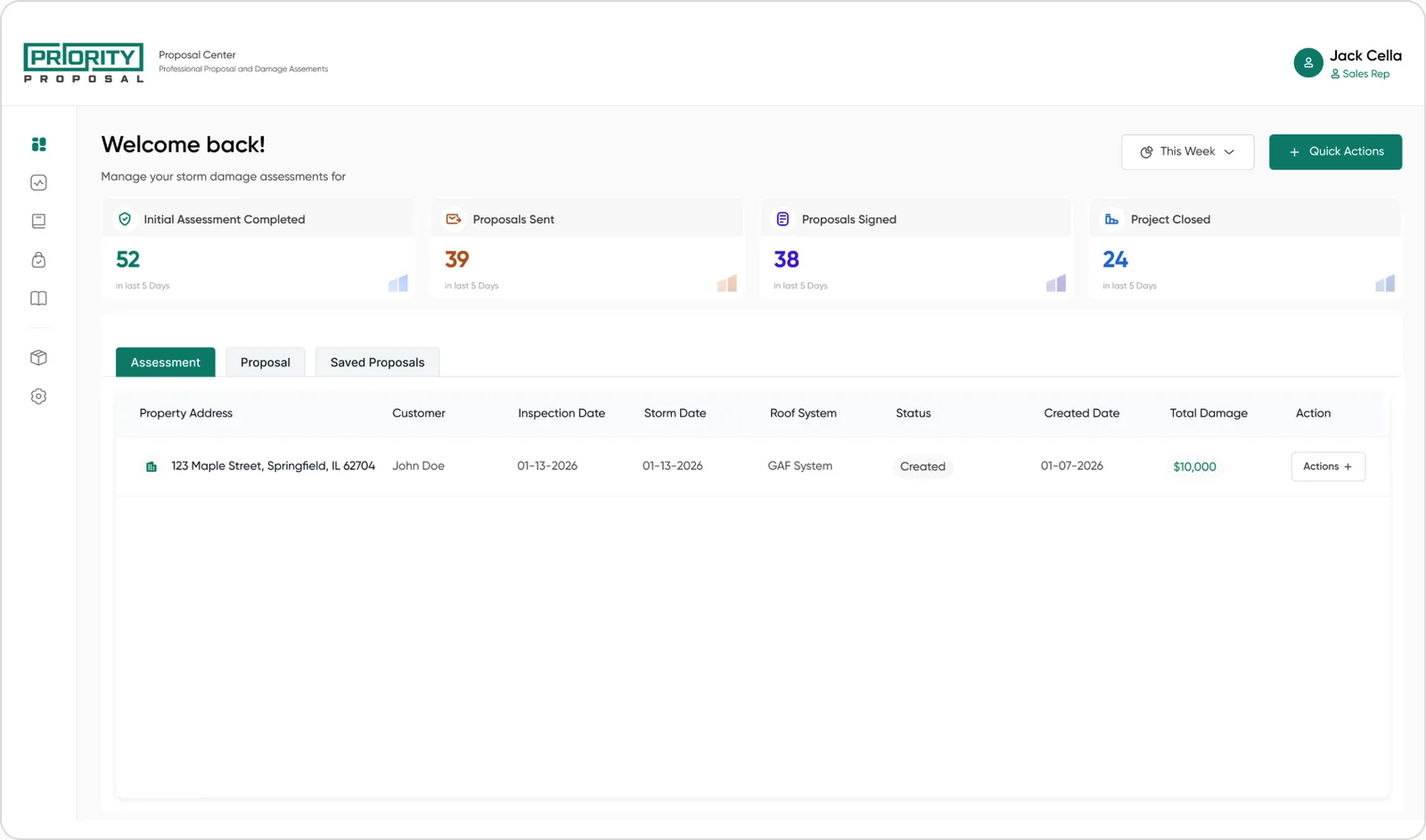
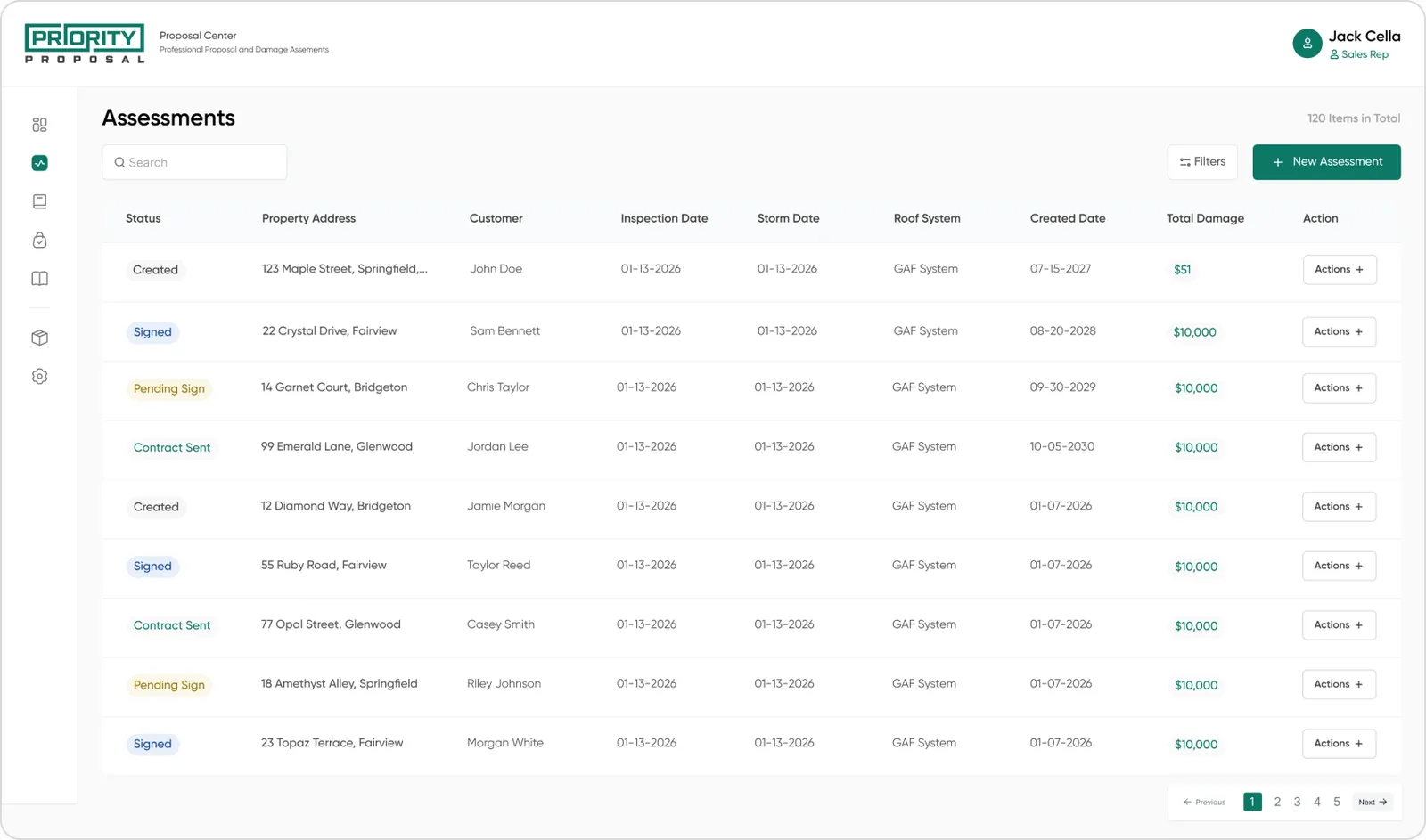
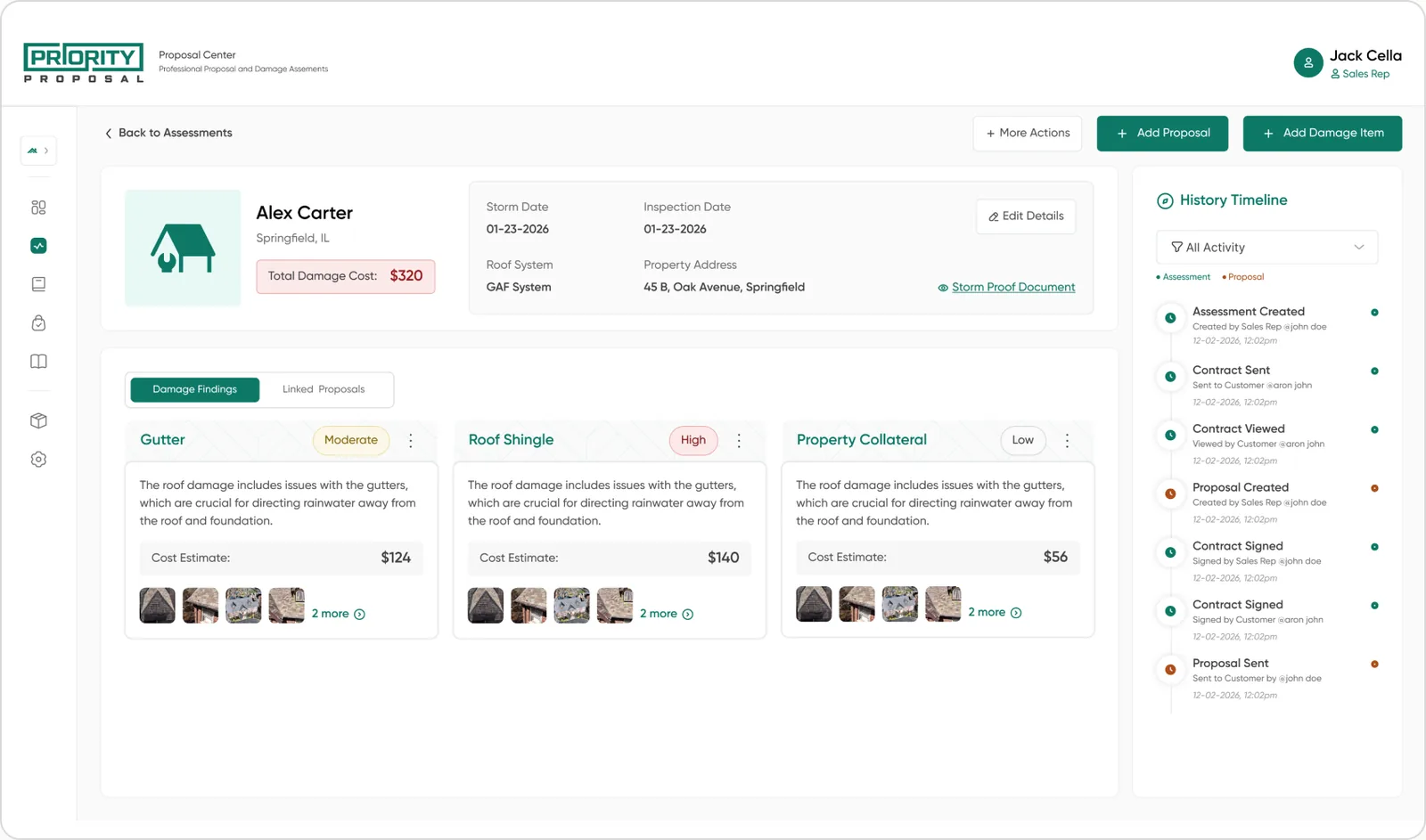
Assessment
Inspect properties, record damage items, and capture photos and documents in one structured workflow, the grounding data the AI agent drafts from when a job has one linked.
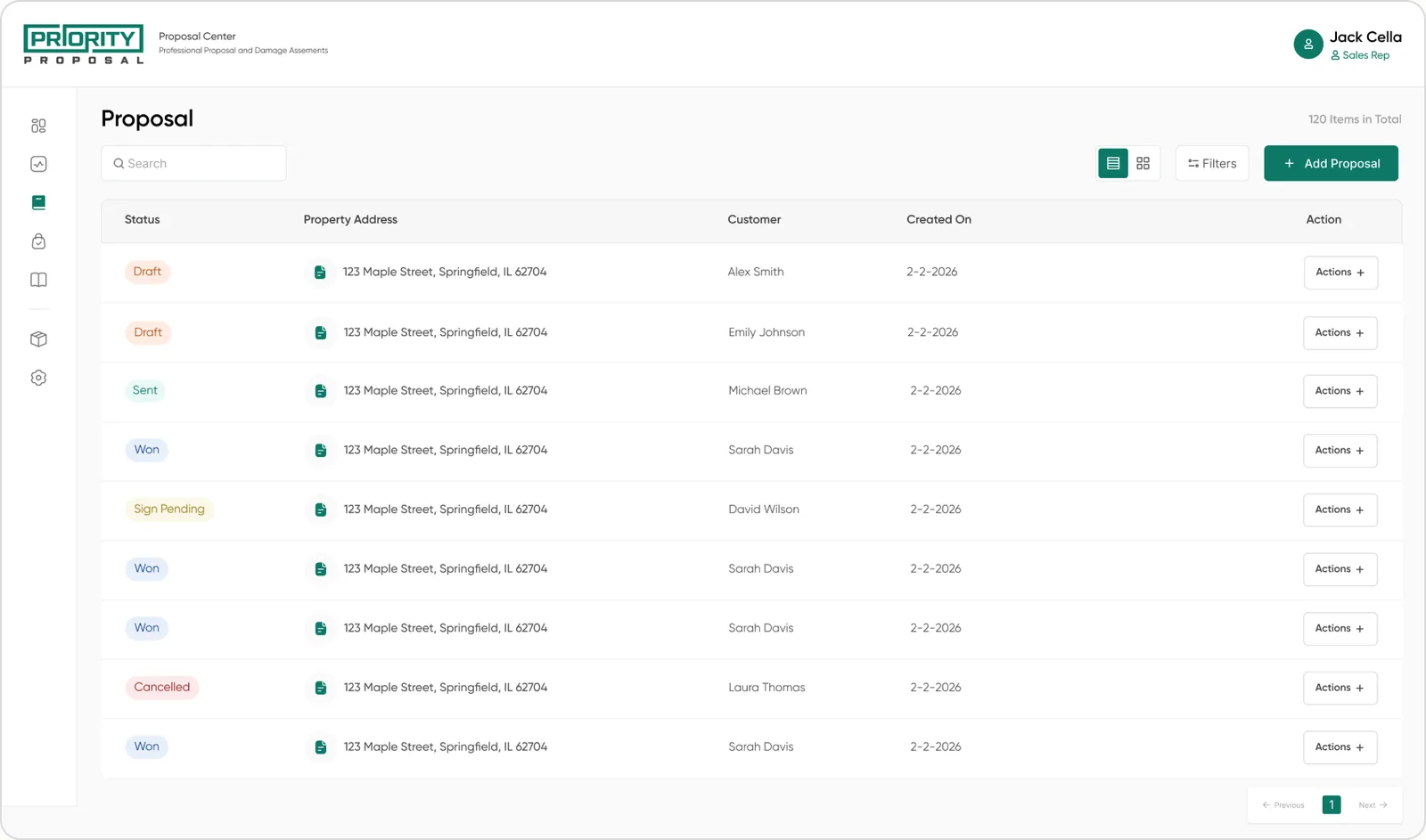
Proposal
A flexible builder for customer proposals, customizing sections per roofing service, with every field linked to its CRM job. A rep chooses upfront whether the proposal is linked to an assessment or stands alone; an inline AI agent can draft it from a prompt either way, then refine sections as the rep edits.
Templates
The fallback for when a rep would rather start from a known shape than a prompt. Templates keep a proposal within a category; a rep can use one as-is, modify it, or build a new one from scratch.
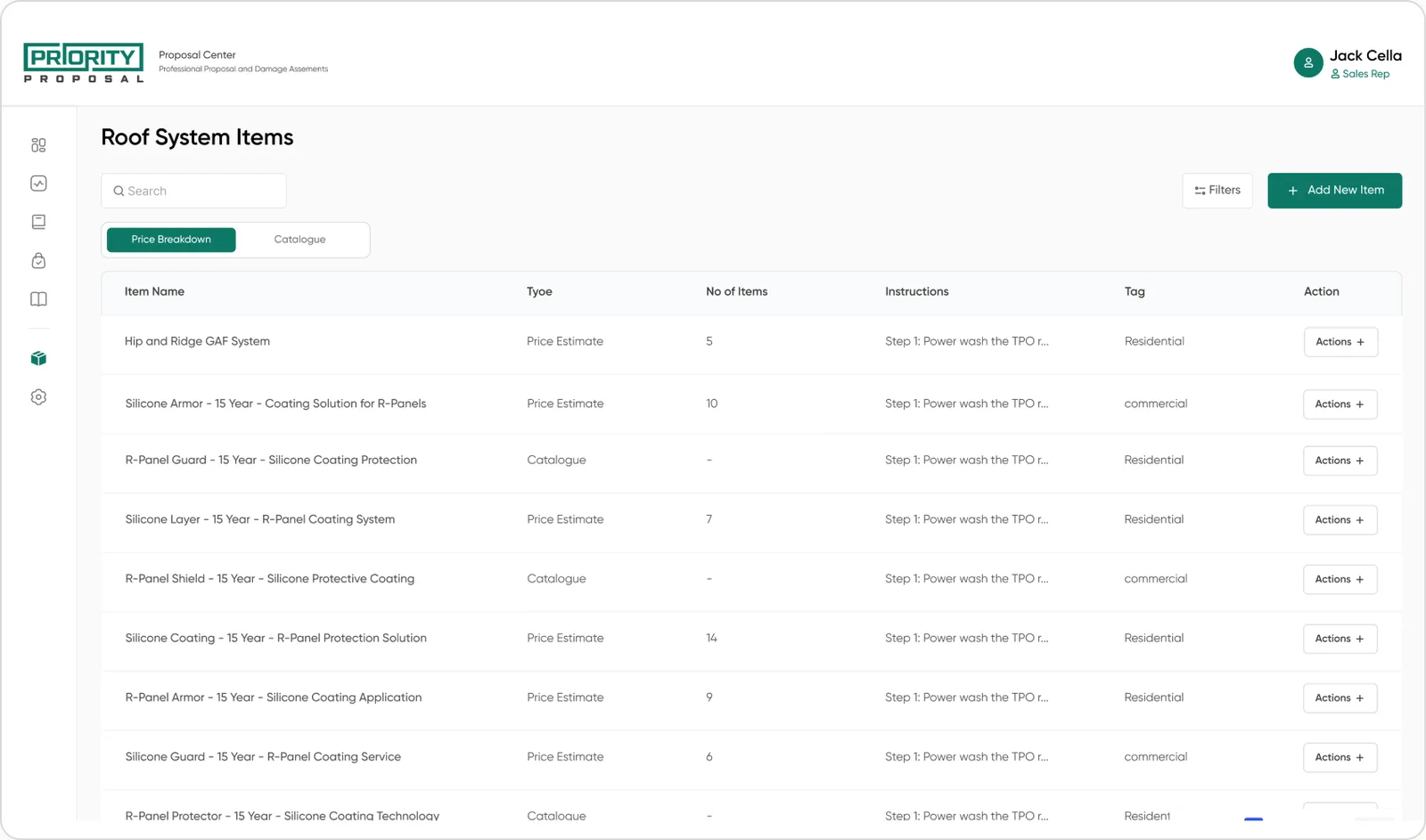
Catalogue Management
The AI agent's price ceiling: it can only price what's in here. The shared catalogue behind both estimate types, itemized line items and build-specific roof systems, with every entry carrying its own instructions and price.
Settings
Centralized configuration for how assessments and proposals behave across the team.
Digital Contract Signing
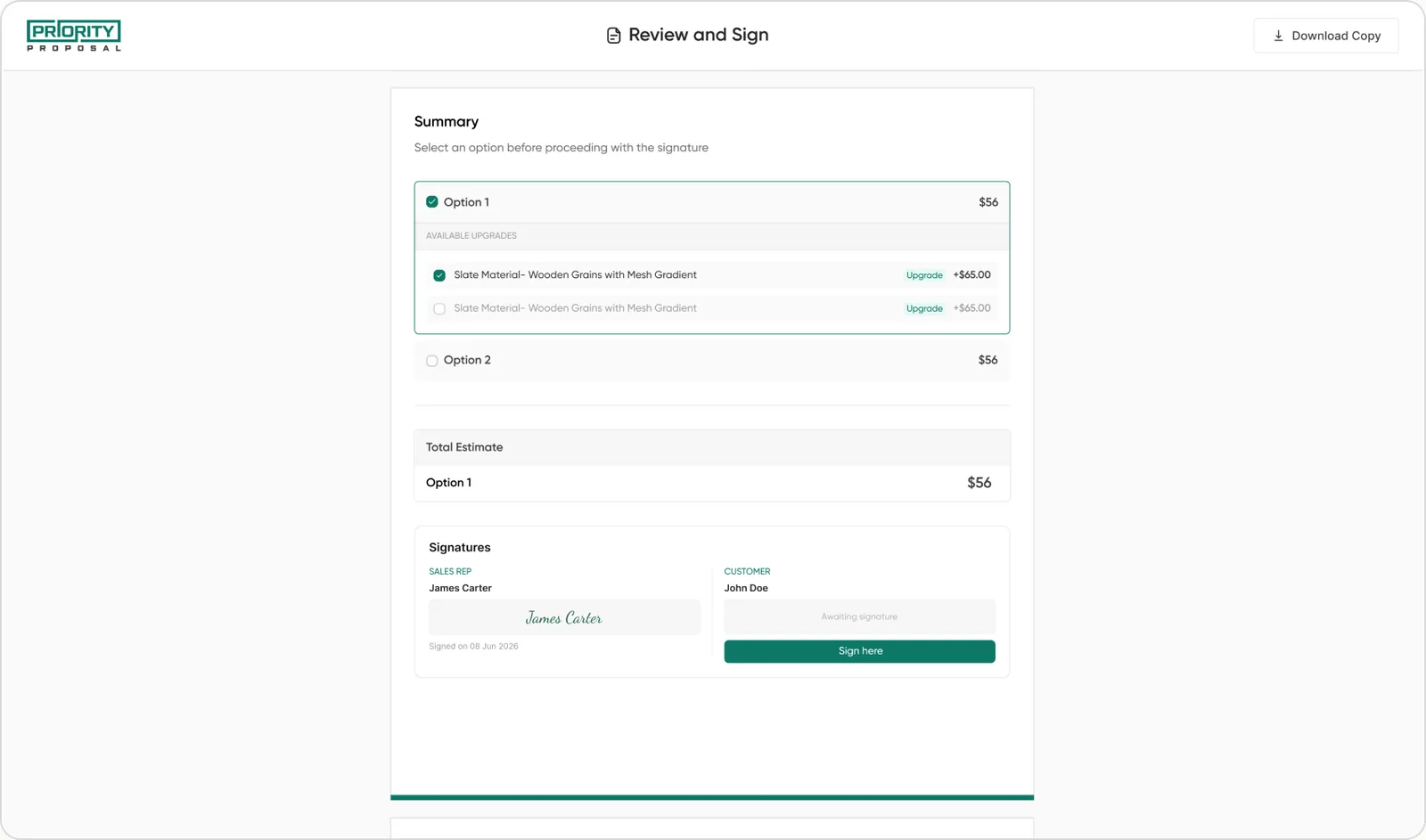
Once a proposal is approved, rep and homeowner complete the agreement digitally, and it becomes part of the connected project inside the CRM.
Shipped, and Still Being Refined
This has already launched and is in active use by the sales team, it isn't a pilot. From here, the work continues: fixing what usage shows doesn't work and improving it step by step. So instead of an impact section, here's an honest status report: what's shipped, what's being refined, and what's still ahead.
- Assessment module, inspection, damage capture, photos, documents
- Proposal builder with itemized and roof system estimate types, linked or standalone
- Templates and catalogue management
- AI agent for prompt-to-draft and always-on inline editing
- Refining the overall experience based on how reps actually use it day to day
- Enhancing the AI editing experience with support for documents and reference material
- Linking CompanyCam, a job-photo app, to sync assessment photos automatically
- Deeper CRM data linkage beyond the property address that's already connected
The blank page is gone
Every new proposal starts from a draft now, not a template hunt or an empty section list. Reps open the builder and prompt first; template-first is now the exception.
Assessments turn into priced proposals same-day
A draft that used to wait for a rep to sit down and write it now exists minutes after the inspection ends, still editable, but never starting from zero.
Roofr logins are already dropping off
Reps default to our own app even for jobs that don't strictly require it, nothing has to be retyped thanks to the CRM sync, and the AI draft is faster than anything Roofr offered, which was the entire bet behind building our own.
A light sync by the job beat a deep one, and it was enough
Integrating Roofr's API would have shipped faster and kept both systems in sync. Building our own took longer, but linking it to the CRM by nothing more than job and property address was enough to remove the re-entry, without merging two products into one.
Flexibility has to live in the proposal, not just the template
Templates alone couldn't cover every roofing service. The real fix was making proposal sections rebuildable per job, with templates as a starting point.
Approval is a workflow event, not a signature
Treating homeowner approval as a state change on the job, not an email to notice, is what let the contract-signing step trigger the job automatically.
Building next to a live CRM changes how you sequence work
Every module here had to work with production data the CRM already depended on daily, meaning a different ship order than a greenfield build would allow.
Proposal drafting completion
Proposals with an AI edit
Completion rose from 40% to 60%, and AI editing went from a rarely-touched feature to something used on 4 in 10 proposals.
Reps were starting proposals and abandoning them before AI drafting existed, the blank page was the drop-off point. The inline editor built on that: once a rep had a full draft to react to instead of a form to fill in, editing by conversation read as faster than typing changes by hand, pulling both numbers up. Volume moved too: drafts went from an average of 12 a day to about 30, a rough read from job data, but directionally consistent with the rest of the pilot.